
Book Review: Learning NServiceBus
We are ramping up on our development of a new version of existing system that 
We are ramping up on our development of a new version of existing system that
In the marketing world tag (or pixel) is used for tracking purposes. Historically it was based on a call to retrieve a 1x1 transparent image. Rational behind this was to retrieve client side information of a site visitor on a 3rd party server. Information would include browser standard information including cookies. There’s a lot of things that can be done with this information from analytical and marketing point of view.
RavenDB is amazing. You don’t have to work with it for a long time to get that. What’s even more amazing is the extensibility and testability of it. This post is about the last two.
In my recent work I needed to have versioning of documents with very specific requirements that are not matching RavenDB built in versioning bundle. Default versioning bundle would generate revisions of all documents upon any change that occurs to a document. In my scenario, I needed only 1 revision at any given time, and revision should be generated only for the documents that have a Status field and its value is changing to “Published”. Very specific to the business requirement. After poking around, reading documentation, and bugging people on user group, I learned a few things about testing custom bundle/plugin RavenDB style.
I have ran into an interesting message when opened a user group site in Visual Studio (not something that I usually do) and it made me wonder
What version of IE Visual Studio 2012 Update 2 CTP is using if not the one found on machine (IE9 on my Windows 7)
Google is playing dirty… this message would only show up in IE version 8 and lower.
RavenDB has a great way to monitor what’s happening between client and server. I found it very helpful when trying to figure out what’s happening, or just understand how things work (such as querying).
When doing unit testing, the pattern is to leverage in-memory store to speed things up. Unfortunately, when that’s the case, there’s exposed communication happening between unit tests (client) and in-memory store (server).
There are a few possible solutions folks have suggested, but one that really made my day was… custom logger. This is a fantastic way to tap into what’s happening and see it all (Thank you Matt Johnson for help).
If you are doing web development, then you have the headache of testing your web application on various browsers. What makes it even more “fun” is the fact that on a given OS you might run multiple browsers of various versions. What I have done in the past was targeting “standard” browsers. That was long time ago, and today reality is a little more challenging. Along with the desktop browsers, nowadays there are mobile browsers that are making things a bit more complex.
Year end is always an interesting time. Reminds a sort of retrospective, but that’s a geek in me that sees it that way. Yet what happened this year? A lot for me. Here’s a list of significant things for me:
This was a good year, packed with lots of learning and new things. The goal for 2013 is to keep it that way and exceed.
One of our latest projects has failed to restore nuget packages on the build server. Error message was
Package restore is disabled by default. To give consent, open the Visual Studio Options dialog, click on Package Manager node and check ‘Allow NuGet to download missing packages during build.’ You can also give consent by setting the environment variable ‘EnableNuGetPackageRestore’ to ’true’.
I have looked into options, and was surprised that default way to handle it was

Quite amusing to read pros and cons of not having a start menu button in Windows 8. Debates from how great it is to how poor the decision was to remove it are all over the web. 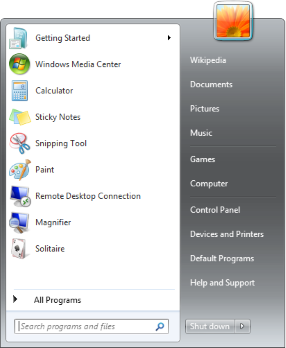
I know people want to be able to navigate to their apps quickly through a single point. But for the love of simplicity, is THIS simple? Yes, I am talking about that monster hiding behind little cute as button button… Start Menu. Not only you had to click through multiple times, but also you had to master multiple cascading menus that where chaotically expanding all over the screen, unless you never installed applications and had it nice and tidy. Is this what people are complaining about? Hmmm, interesting.
Our group is moving to Git for code management and we were looking for in-house hosting option on Windows platform. I was surprised to find out that out of the box there are not many options. Rolling your own solution (aka setting it up manually) was not an option as we are a small group that is already tasked with enough work. So I started my search for free or paid options. You can guess that options were limited, yet one product I found has exceeded expectation and was just perfect – SCM-Manager. Easy, simple, smooth integration with Active Directory and Jenkins build server. What else a boy needs  Not to mention that it’s absolutely free. Amazing piece of work. Highly recommended.
