Home avatar

Thoughts and code

Assembly in GAC and Configuration File

Working with BizTalk pushes the creativity sometimes. This time around, I needed to have an assembly deployed to GAC (so that BizTalk application can easily use it) and at the same time being able to configure this assembly without re-deploying it to GAC again.

Normally, an assembly has a configuration file (.config) that is bundled with assembly and serve as it name indicates. With GAC it’s different. Regardless of method of deployment into GAC, it only accepts an assembly file, nothing else. This is where shared knowledge and creativity kick in.
Bizmonade

Bizmonade is a project allowing to simulate execution of BizTalk orchestrations without deployment to BizTalk server. What is it good for? Testing. Unit testing. The fact that the logic can be tested without deployment hassle is good. There are a few issues that I have encountered so far, and my experience with the particular tool is less than 24 hours (so excuse me in case I am not accurate – corrections are welcomed always):

Building AssemblyInfo for BizTalk with NAnt

All assemblies deployed into production are versioned. My personal preference

image
image
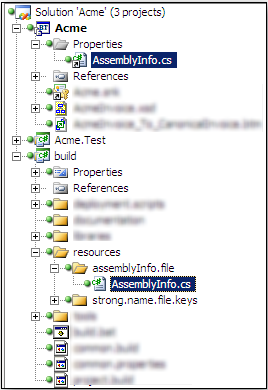
is to achieve that with build scripts, ensuring that build number, code revision, minor and major versions are all inserted. AssemblyInfo.cs is the file that normally contains that information. I normally generate a dummy AssemblyInfo file in the build project and reference that from the project(s). This way, when building with scripts, we can generate dynamic AssemblyInfo.cs file and overwrite the link. The link is a one way link, nothing is updated in the build project. And since link is just a reference, nothing is modified from the repository point of view. NAnt has task that does all the job. Except that for BizTalk its not straight forward process (of course, how could it be).

Change MsBuild Script with NAnt XmlPoke

For automated deployments of BizTalk application, I am using MsBuild scripts packaged with compiled BizTalk artifacts. Build scripts are in NAnt. I wanted from NAnt build script to update MsBuild deployment script.

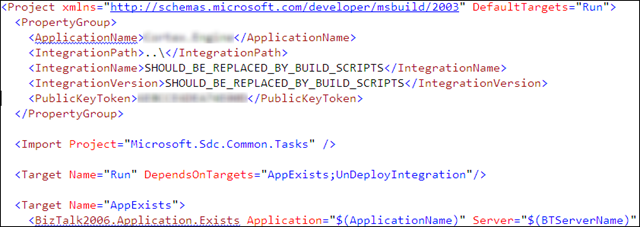
MsBuild deployment script looked like this:

image
image

For this task NAnt XmlPoke is the right tool to use, except that this didn’t work, until I realized that I need to use namespace prefix. Once prefix msb was in place, it worked as charm.

Testing BizTalk Custom Pipeline

There are a few ways to test BizTalk Custom Pipelines out there. If you want automatically execute pipeline on input and verify it’s not exploding, you can leverage TestableSendPipeline coming along with BT projects.

A few things that are required for this to work:

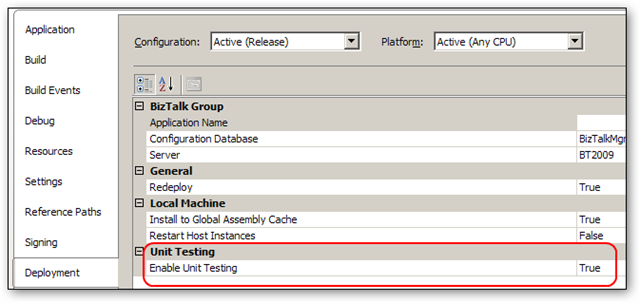
  1. Enable unit testing on the BT project

000
000

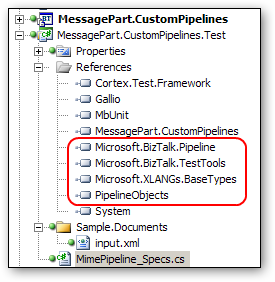
  1. Include PipelineObjects.dll assembly found at %programfiles%\Microsoft BizTalk Server 2009\SDK\Utilities\PipelineTools into your project and reference it from your test project along with other BT assemblies.

001
001

Automated Builds and Deployment for BizTalk

Automated builds are an essential part of Continuous Integration. Definition commonly found is

Continuous Integration is a software development practice where members of a team integrate their work frequently, usually each person integrates at least daily - leading to multiple integrations per day. Each integration is verified by an automated build (including test) to detect integration errors as quickly as possible. Many teams find that this approach leads to significantly reduced integration problems and allows a team to develop cohesive software more rapidly.

Digitally Imported

If you are a fan of electronic music, and happen to find yourself in a place where there’s not a single radio station playing electronic music – this is the URL to remember: http://www.di.fm/

Thanks goodness there’s internet…

PS: Yes, I am located in Calgary :) Shash!

Sending Big Files with WCF

I had to look into a project that submits large files to WCF service. Implementation is based on data chunking. This is a good approach when your client and server are not both based on WCF, bud different technologies.

The problem with something like this is that chunking (either you wish it or not) complicates the overall solution. Alternative would be streaming. In WCF to WCF scenario, this is a piece of cake. When client is Java, it becomes a bit more challenging (has anyone implemented Java client streaming data to WCF service?).

Comparing Checksums

This is something trivial, yet got me to think for a little. I had two checksums, one received from a client invoking a service, another one calculated once data sent into service is received. Checksums are plain arrays of bytes. I wanted to have comparison to be expressed as simple as possible. Quick google search brought me to a post that dealt with the same issue. But linq expression was too chatty and I think the solution was a bit muddy.