Home avatar

Thoughts and code

Hello Microsoft.Azure.ServiceBus

hello

If you’ve missed the news, a new Azure Service Bus client is emerging on the horizon.
tweet

This client is a significant development under the umbrella of multiple changes taking place in the Microsoft camp. A few of those are:

  • Open Source support
  • Public collaboration
  • Investment into documentation
  • Client customization

Open Source support is a big one. In the past, the WindowsAzure.ServiceBus client we’ve learned to love and hate was closed source. While decompiling was possible, that is far from optimal experience trying to understand the code and the decisions behind it. The code for the current client will stay closed, and probably good that it will. Some skeletons shouldn’t be out of the closet.

Monitoring all Dead Letter Queues. Yes, multiple.

enter image description here

In my previous post The secret brotherhood of the message counts I talked about sub-queues any Azure Service Bus queue has. For a queue those where:

  1. queue/$DeadLetterQueue
  2. queue/$Transfer
  3. and queue/$Transfer/$DeadLetterQueue

In this post, I’m going to focus on the importance of monitoring TDLQ (Transfer DLQ).

Imagine the following scenario:

scenario

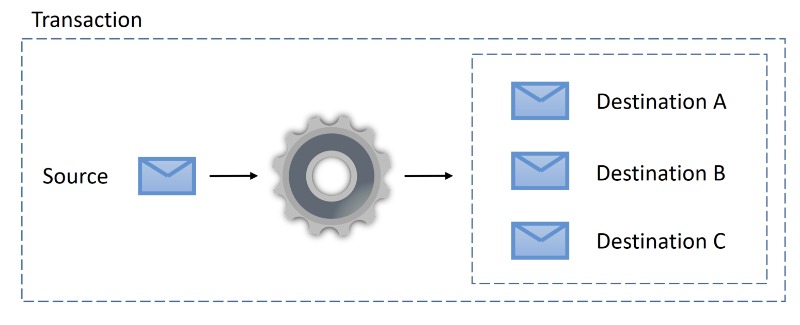
A proess is handling a message from source queue. During processing, several messages are created and dispatched to various destinations dest-a, dest-b, and dest-c. With transaction and send-via it all works just great. This is what it looks like before message is processed and after:

Azure Service Bus Message: Wanted Dead or Alive

enter image description here

Running NServiceBus on Azure sometimes can be challenging. Take for example the Azure Service Bus transport. Every queue has additional queues that could contain either dead-lettered messages as a result of repeated failing processing of the poisonous messages or unsuccessful transfer.

With multiple endpoints and their queues, you want to be able to monitor your system and know when things are going south. Particular Platform offers a monitoring tool, Service Control that is designed specifically for this purpose. Except it monitors endpoints for successfully processed and failed processing messages. Not quite the whole story for the ASB’s dead-letter queues, isn’t it?

The secret brotherhood of the message counts

Shhhh

When working with Azure Service Bus, message count is expected to report how many messages are found in the queue. Only if life was that simple. In the real world, things a bit more complicated.

Let’s assume there’s a queue, named queue which receives messages. Whenever a message fails to be processed more than MaxDeliveryCount times, it is assumed to be a poisonous message and is moved to what’s called a dead-letter queue (or simply DLQ). Here’s a first not-so-secret member of the brotherhood. DLQ path for queue would be expressed as queue/$DeadLetterQueue. ASB client has a convenience API (client.FormatDeadLetterPath(path)) to get the name of the DLQ for any given queue.

Azure Service Bus Client Performance Counters

enter image description here

Identifying issues is never trivial. It is even harder when the problem is hidden, and there’s are no logs or traces to go through.

Application using Azure Service Bus started to throw an exceeded quota exception for the number of concurrent connections the broker permits for a namespace, which is 1000. I needed a way to confirm if the application is the source of exhausting the connections or not.

Notifications with MyGet and Azure Functions

enter image description here

If you’re doing .NET development, you’re probably familiar with NuGet packages. You might have also heard about MyGet service that offers an excellent package management. But have you looked at the additional things MyGet can provide? In this post, I’ll focus on one of those hidden gems - webhooks.

Scenario

Scenario to implement is a requirement to receive notification about pre-release package builds added to MyGet feed for a specific nuget package.

Bend Message Deduplication on Azure Service Bus to Your Will

Do not duplicate

Duplicates detection functionality provided by Azure Service Bus can automatically remove duplicate messages sent to a queue or topic. Deduplication is always based on the value of the MessageId property. No other property can participate in deduplication.

In the real world, message deduplication can often depend on things that are part of the message payload itself. Let’s say we process orders*. Deduplication would rather be based on the order ID and not message ID. There are a few creative solutions that allow custom deduplication. For example, perform deduplication outside of ASB broker by manually inspecting message payload and marking it as a duplicate. For example, using Azure Functions and Storage tables**. While approach like this one works, it has several drawbacks:

Azure Functions to make audit queue and auditors happy

Using NServiceBus on Azure allows the best of two worlds – robust and reliable messaging framework on top of excellent Azure services. Azure services and any other cloud provider as well have strict capacity and quotas. For Azure transports NServiceBus is using, those are usually allowed maximum throughput, the total number of messages, the number of concurrent connections, etc. With Azure Storage Queues there’s an additional constraint that while is not significant on its own, does have a weight in a system: maximum message TTL is seven days only. Yes, yes, you’ve heard right. 7 days only. Almost as if someone at the storage team took the saying “a happy queue is an empty queue” and implemented maximum message TTL using that as a requirement. While it’s ok to have such a short message TTL for a message that is intended to be processed, for messages that are processed and need to be stored that could be an issue.

Service Bus HA with paired namespaces

Azure Service Bus is one of the oldest cloud services on Azure. As any service living in the cloud, it grows, iterates, and changes. Among various features that the service has, there’s one that could deserve a little more attention: paired namespaces.

An application communicating over Azure Service Bus is usually utilizing a namespace. Services and sometimes even entire regions can go down. That makes a single namespace a single point of failure. A possible solution is to enable high availability of the service. This is where Service Bus client can help. It can do so by using two namespaces rather than one. A primary and a secondary namespaces. The client is using both namespaces to achieve high availability. The feature is called PairedNamespaces.

Abandon with Reason

In some cases, when a message should be abandoned, Azure Service Bus offers BrokeredMessage.Abandon() API. The message is abandoned immediately; delivery count is increased, and message re-appears on the broker. In case MaxDeliverCount is exceeded, the message is moved to the designated dead letter queue. Whenever a message is moved to a dead letter queue, it is stamped with two standard properties: DeadLetterReason and DeadLetterErrorDescription. Here’s an example of how to get a message dead lettered and stamped with these two properties