Home avatar

Thoughts and code

ServiceBus Explorer tool

Tooling is an important part of the development experience. No matter how good a service you’re using is, if there are no decent tools, you always have that disgruntled feeling about the entire experience. When developing against hosted services, tools are either coming from the service provider or a third party.

For Azure Service Bus current options are somewhat limited. There are no tools provided by the ASB team itself. Hopefully, that will change one day. There are options such as Cerebrata Azure Management Studio. While the tool is excellent, specifically for Azure Service Bus it feels same as dining at a fancy restaurant with utensils where a knife is a Swiss army knife. Perfect for many things, but not so much for a very particular usage.
Elvis Operator to the Rescue

Null-Conditional Operator in C# 6 (?.), also known as “Elvis” operator, has allowed compacting code by removing boilerplate code for a null check to avoid NullReferenceException. But there’s more to that than just a null check. I’ve run into a case where Elvis operator also removed need for an extra code to implement a Decorator pattern, which resulted in removing complexity. Here’s the original code implemented using Decorator pattern:

Azure and Open Source Software

Not so long ago Microsoft made a deliberate choice to play the OSS game, and it was quite a welcomed change. Rome wasn’t built in a day. So it this initiative. It’s a long and bumpy way. Along the way we all, maintainers and contributors, learn along.

While working on some Azure Storage related code with one of the WesternDevs, Don Belcham, we’ve run into a bug in CloudBlockBlob functionality to acquire a lease. In the old version of storage library, the lease could be up to 90 seconds, wherein the later version it was truncated to 60 seconds maximum.

Capturing Azure calls with Fiddler

When working with Azure Service Bus or Storage Queues, Fiddler help in troubleshooting errors that could happen while talking to the remote service. Particularly useful when there’s a mismatch between .NET client library that wraps RESTful API and remote service. Using Fiddler, you can trace the traffic going back and forth. Communication happens over HTTPS and sometimes Fiddler can refuse to show the values. When that happens, you no longer troubleshoot your Azure Service usage, but Fiddler configuration. Luckily, the fix as easy as resetting certificates used by Fiddler.

Humanitarian Toolbox

I’ve heard about Humanitarian Toolbox a few times on the .NET Rocks Show. In case you’ve never heard of it, this is what it is:

Humanitarian Toolbox (HTBox) is a charity supporting disaster relief organizations with open source software and services. We are developers, designers, testers, and industry professionals who want to contribute our unique skills in disaster relief aid. Whether it is through creating apps that map the spread of disease or maintaining software that helps to optimize the delivery of relief supplies, Humanitarian Toolbox has a goal of creating software and programs for relief organizations to have ready in times of need.

Azure Service Bus - Batching Brokered Messages

There are scenarios when messages need to be sent in bulk. For example: you recieve a message with CSV-like data and generate multiple messages (message per record in the file). To gain performance, generated messages can be batched and sent out in an atomic operation.

Azure Service Bus has an ability to batch outgoing messages as an atomic send operation using MessageSender.SendBatchAsync() API. It works great as long as the total size of the messages in the batch does not exceed 256KB. One possible solution could be dividing brokered messages in into chunks and send multiple batches. An attempt like this was implemented by Paolo Salvatori in ServiceBusExtensions. Unfortunately, there’s a caveat to this approach. The idea of this grouping is based on evaluating the size of the each BrokeredMessage and adding messages to a batch while total size is below the 256K limit. What’s the problem with that? The devil is in details.

NServiceBus VideoStore with Azure WebJobs

In my previous post I have demonstrated how NServiceBus endpoint can be hosted in a WebJob. To extend that concept and demonstrate that you could host multiple endpoints, I have taken NServiceBus VideoStore sample application and converted non-web endpoints to be hosted int WebJobs. Bits, as usual, are on GitHub.

This sample demonstrates an online ordering system for purchasing videos. Behind the scenes, there are a few endpoints. Sales endpoint is executing a long running process (aka Saga in NServiceBus world) called ProcessOrderSaga. This saga is executed for each submitted order. A few other endpoints (Content Management, Customer Relations, and Operations) are involved as well, using commands and Pub-Sub mechanism.

Azure Portal - Active Path

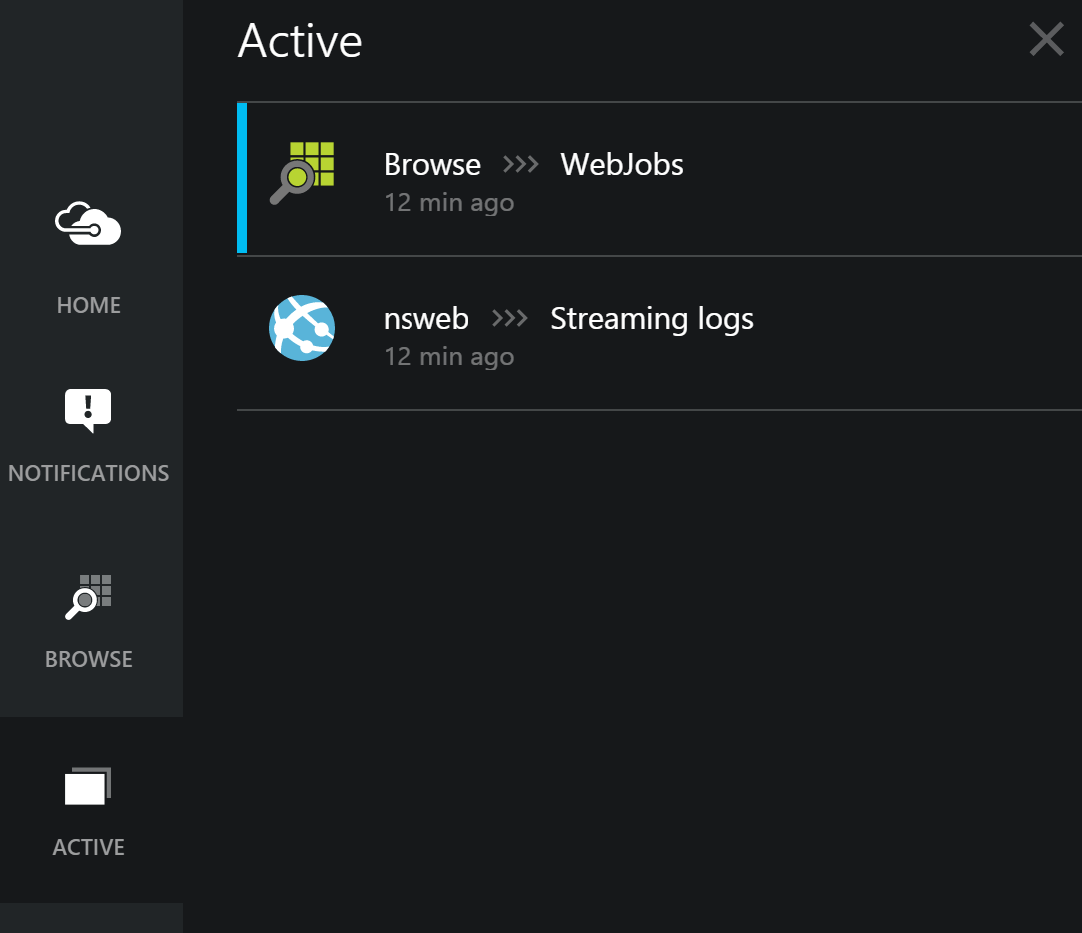
If you’re slowly moving from the current Azure portal to the preview portal (new-new portal), there are a lot of hidden gems. One of those gems is Active Paths feature baked into the portal on the control bar on the left side.

Where it is really handy, is when you need to access several sub categories from the same blade. In my case, I needed to access WebJobs and Streaming logs blade at the same time.

NServiceBus with Azure WebJobs

Azure WebSites have become a significant building component on Azure platform lately, with many features and tools built around it. WebJobs is one of the features, based on Kudu engine, that allows to run background tasks in Azure website. There’s plenty of information about Azure WebJobs and possibilities it opens for Azure WebSites. I’d like to highlight 2 interesting facts:

  1. WebJobs aims to make developing, running, and scaling this easier
  2. There is no additional cost to use Azure WebJobs

Scott Hanselman had a very good post on how he’s using WebJobs to make development, running, and scaling easier.